Your first export.
One step at a time.
Ten short sections, real interface screenshots and a guide you can keep offline. This covers the separate Resolve script, not the Mac app.
Download the 10-page PDFScreenshots captured on macOS Resolve 21.1. Windows/Linux appearance and GPU behavior are not validated. Always start with copies.
One focused workflow.
Add media. Choose compression. Render and verify. This guide covers Resolve Script Beta 9, not the native Mac app.
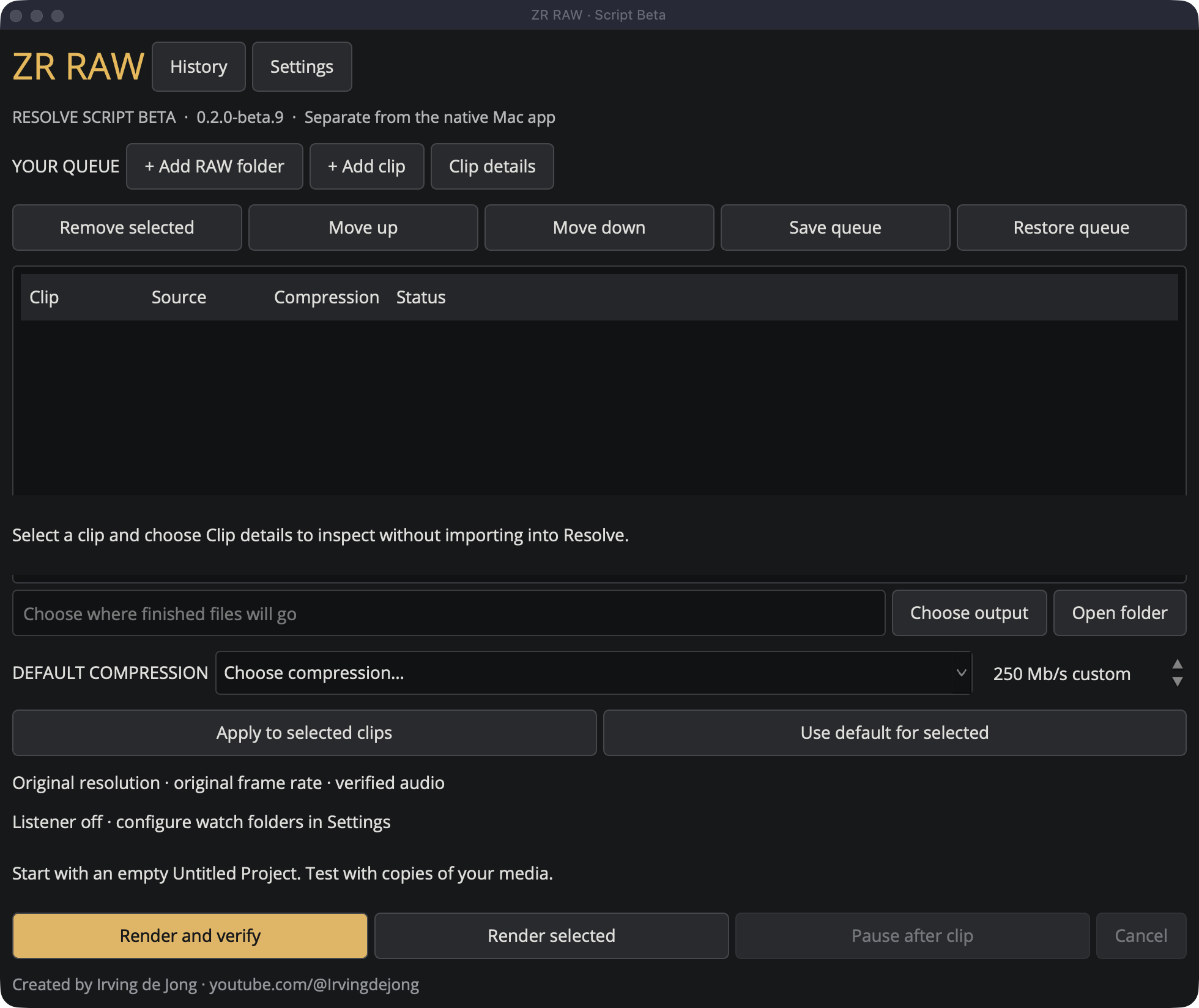
Start small
Use a short copied clip and a separate test library before committing a full shoot. Save any existing Resolve work first.
Check the scope
Requires Resolve Studio 21.1+, Python recognized by Resolve, and trusted ffmpeg/ffprobe executables. This is a script inside Resolve, not a Windows EXE.
Read the screenshots correctly
These are real signed Beta 9 windows captured on macOS Resolve 21.1. Windows/Linux appearance and GPU behavior are not validated. No media or approval state was fabricated.
Install once. Open one menu option.
Extract both folders from the beta ZIP into your user Fusion folder. Keep the runtime alongside Scripts, not inside it.
Download and extract
Choose the download for your OS. Close the script before replacing its files. Merge Scripts without replacing unrelated scripts.
Open one launcher
Use Workspace > Scripts > ZR RAW Script Beta. Some hosts show a Utility group. Save your work before restarting Resolve if the menu has not refreshed.
Check requirements
In Settings, set trusted ffmpeg and ffprobe executable paths, or leave them blank if available in PATH. Check system detects capabilities; it does not qualify an encoder.
User Fusion folders
Windows%APPDATA%\Blackmagic Design\DaVinci Resolve\Support\Fusion
macOS~/Library/Application Support/Blackmagic Design/DaVinci Resolve/Fusion
Linux~/.local/share/DaVinciResolve/Fusion
Make your first verified export.
Start with an empty Untitled Project. Save and close editing projects yourself before testing.
Add media
Use + Add clip or + Add RAW folder. Inspect Clip details before processing.
Choose output
Choose output selects the destination for finished files. Use a new test destination, not the camera originals folder.
Choose compression
Start with an available ProRes choice, or qualify H.265 first. For NEV, review the N-RAW pipeline before testing.
Render and verify
The script checks native dimensions, FPS, frame count, codec and audio. Review appearance and sound yourself after the technical checks pass.
Find the result
Use Open folder and History. Finished MOVs live in unique ZR-Script-... / clip-... folders. A PNG preview may sit beside the MOV.
Test the mode on your machine.
A listed GPU or codec is not proof of 10-bit 4:2:2 support. Each mode has its own selected-clip test.
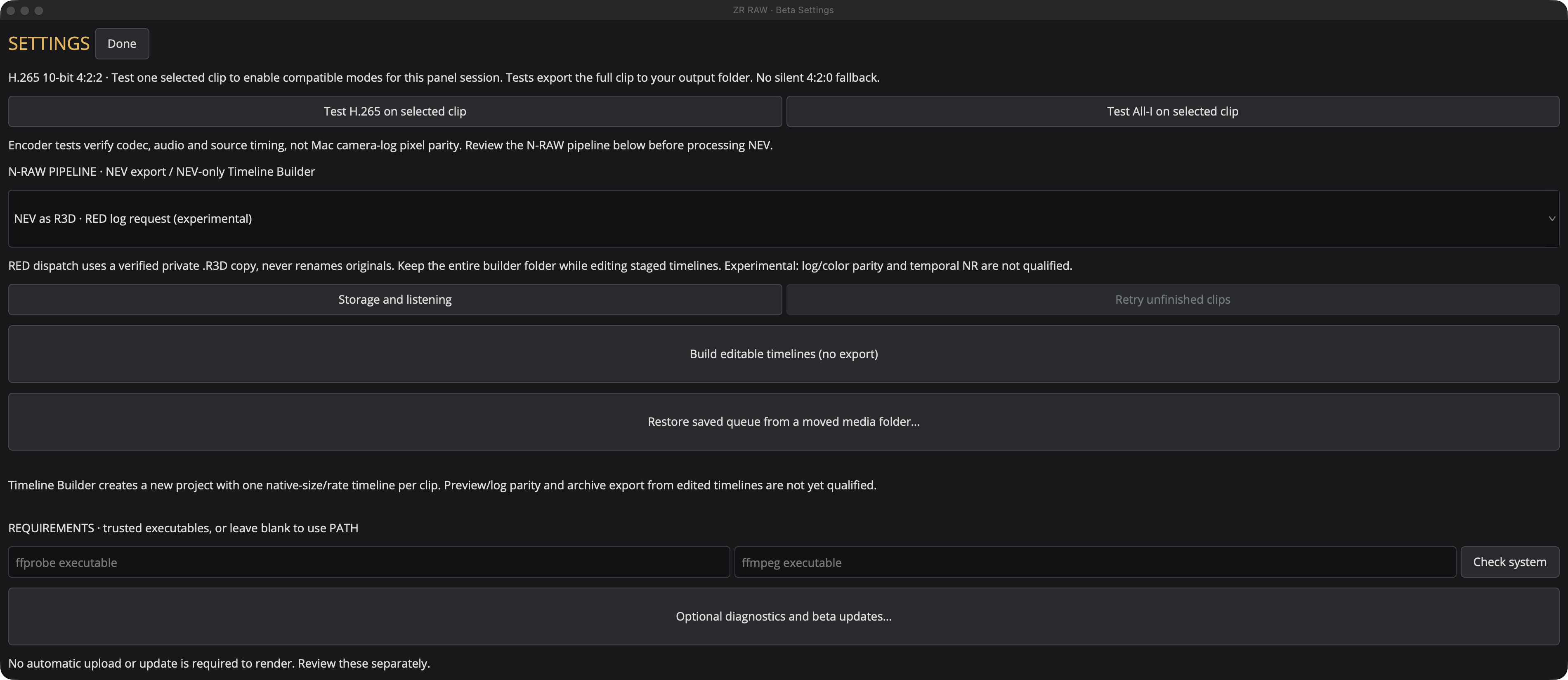
Prepare one short clip
Select exactly one queue row, choose output and set the N-RAW pipeline if applicable. Tests export the full clip, so allow time and disk space.
Test H.265 on selected clip
In Settings, run this test to enable Lower, Standard, Higher and Custom after a pass.
Test All-I on selected clip
Run this separate test for All-Intra. Every decoded frame must pass the I-frame/key-frame check.
Repeat when needed
Qualification lasts while the panel stays open. Repeat after reopening or changing the N-RAW pipeline. Every later export is still checked.
Set compression per clip.
Resolution and frame rate remain native. Requested bitrate is a limit, not a promised file size.
Choose a default
The default applies to unassigned clips. Select rows, choose a mode, then Apply to selected clips for overrides.
Remove an override
Use default for selected returns those rows to the queue default.
Use H.265 Custom
After H.265 qualification, choose H.265 Custom and set 25-800 Mb/s. Apply to selected rows as needed. Custom does not scale with FPS or resolution.
Understand the presets
At 24 fps, Lower is 150, Standard 200, Higher 400 and All-I 750 Mb/s. Non-custom modes use FPS scaling and limits. Actual output bitrate can be much lower.
Save your choices
Save queue preserves sources and per-clip settings. Restore queue does not auto-render or start listening. History shows measured video bitrate.
Choose your N-RAW interpretation.
Review the N-RAW PIPELINE in Settings before testing or exporting NEV footage. A filename extension change does not convert the underlying RAW codec.
NEV as R3D / RED log request
The initial panel choice is experimental. Originals remain untouched, and a full-size private cache copy is required. Full IPP2 and Mac pixel/color equivalence are not proven.
Native NEV / Nikon N-Log
Requests Nikon N-Log output and cross-checks source timing and media characteristics. Allow enough room for a full-size private cache copy.
Native NEV / Resolve defaults
Makes no explicit color request. Resolve may report zero source timecode; avoid this route when original camera timecode is required.
Keep the timeline and its media.
Settings > Build editable timelines (no export) creates a new Resolve project with source-native timelines.
Build, do not render
The builder does not create or verify an archive MOV. Native Mac RAW-edit/grade-preview parity and export from edited builder timelines are not qualified.
Retain the whole folder
Keep the entire ZR-Timelines-... folder while using the project. Moving or deleting its staged media can take clips offline.
Treat builder media differently
Do not clean it like temporary successful-export cache. It is needed when reopening the project.
Listen for arrivals. Keep control.
Open Settings > Storage and listening. The listener stays off until you explicitly start it.
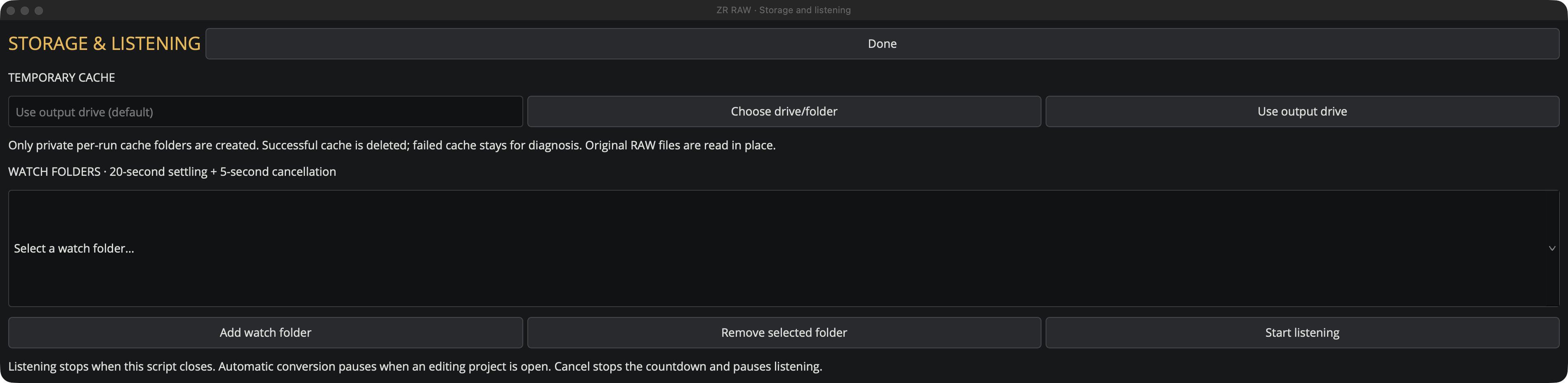
Choose storage
Choose drive/folder sets temporary export cache. Use output drive returns to the default. A disconnected selected drive stops clearly rather than silently switching elsewhere.
Set the export choices first
Choose output, default compression and the N-RAW pipeline before starting automatic processing.
Add watch folder
Add the locations you want, then Start listening. Keep Resolve and the script panel open; there is no separate tray service.
Review the countdown
After 20 seconds of unchanged file size/time, a five-second countdown runs. Cancel stops the countdown and pauses listening. Restart it explicitly.
Update and share only by choice.
Settings > Optional diagnostics and beta updates... Both consent switches start off.
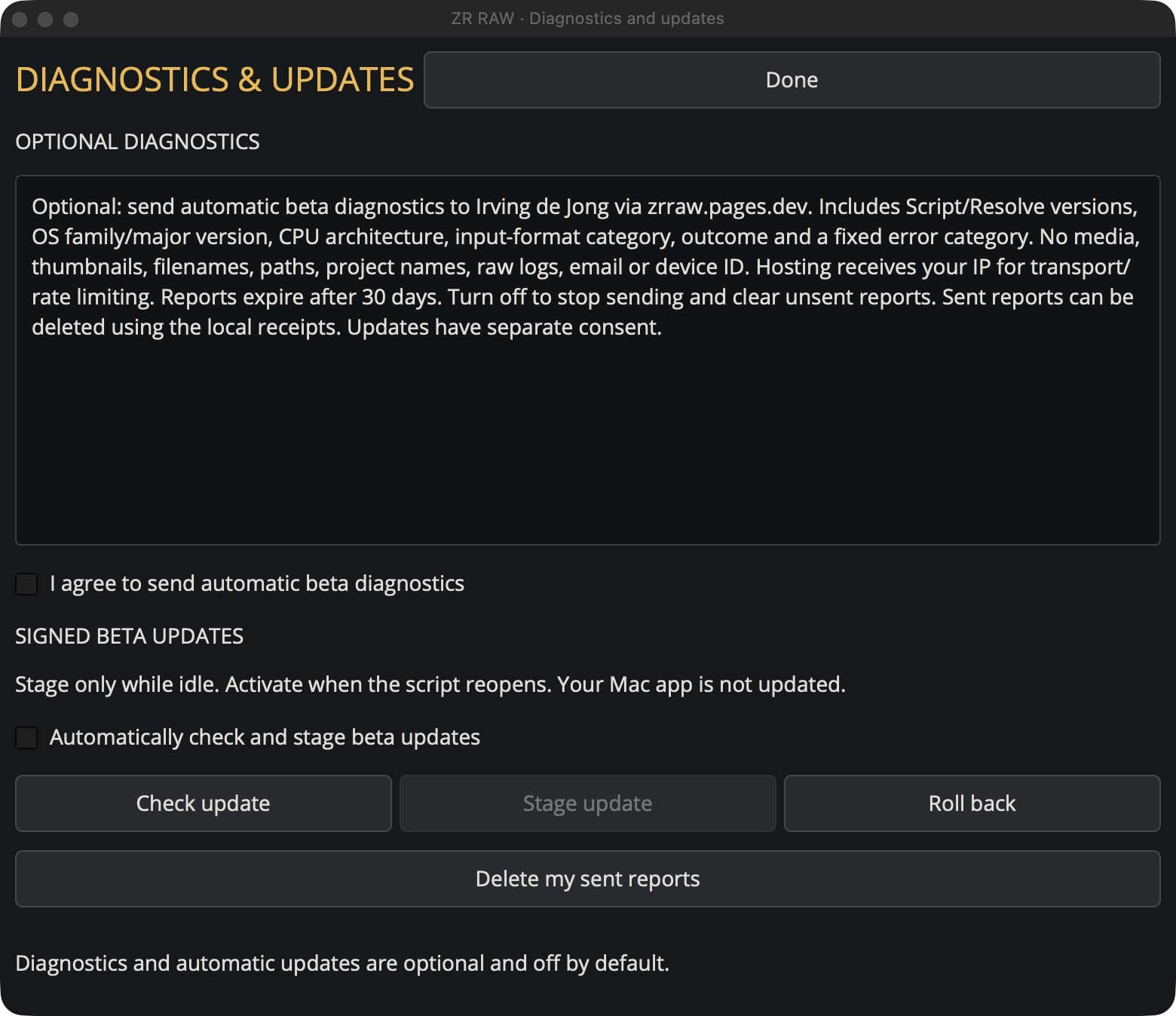
Check update
Check for a beta, then Stage update while idle. The signature and payload are verified. Close and reopen the script to activate.
Roll back
Select a previous verified local version when one is available. This does not change the native Mac app.
Automatic checks
The update checkbox permits idle checks and staging at most every six hours. It is separate from diagnostic consent.
Optional diagnostics
Fixed-category reports contain no footage, filenames, paths, raw logs or emails. Website tester-email signup is a separate consent.
Withdraw diagnostics
Turn diagnostics off to stop future sending and clear unsent reports. Delete my sent reports uses saved receipts; do this before uninstalling if desired.
Get back to a known starting point.
Preserve originals and failed-run evidence. Do not bypass output verification to finish a queue.
No panel or too many script entries
Check there is one launcher under Scripts/Utility and the runtime alongside Scripts. Close duplicate panels. Save work before restarting Resolve to refresh its menu.
H.265 unavailable
Select one clip, choose output, review the N-RAW pipeline and run the corresponding test. Reopening or switching pipeline requires new approval.
Clipped labels
Widen the window. Beta 9 can clip long explanations at compact widths; the Settings and Storage screenshots were widened for readability.
Missing sources
Use Restore saved queue from a moved media folder... in Settings. Review relinked matches before processing.
Render stopped
Save and close your editing project yourself. Check History, executable paths, free space and drive availability. Retry unfinished clips explicitly.
Uninstall the script only
After closing the panel, remove only its separate runtime and single launcher. Exports and retained projects are not automatically deleted.